 how-to
Why Your Sump Pump Battery Keeps Beeping: 7 Fixes
Table of Contents
- Why Your Sump Pump Battery Keeps Beeping
- Low or Aging Battery Charge
- Power Loss or AC Failure Triggering Backup Mode
- Loose or Corroded Battery Terminals and Wiring
- How to Test Your Sump Pump Backup Battery
- How to Reset Your Backup Sump Pump Alarm
- Other Common Causes: Float Switch, Clogged Discharge, and Water Level
- When to Replace Your Battery and Maintenance Tips
- Frequently Asked Questions
Last Updated: August 31, 2026
Why Your Sump Pump Battery Keeps Beeping
A sump pump battery backup system that won't stop beeping is telling you something's wrong. The alarm is a diagnostic signal, not random noise. Understanding what triggers that alert is the difference between catching a problem early and discovering your basement flooded during the next storm.
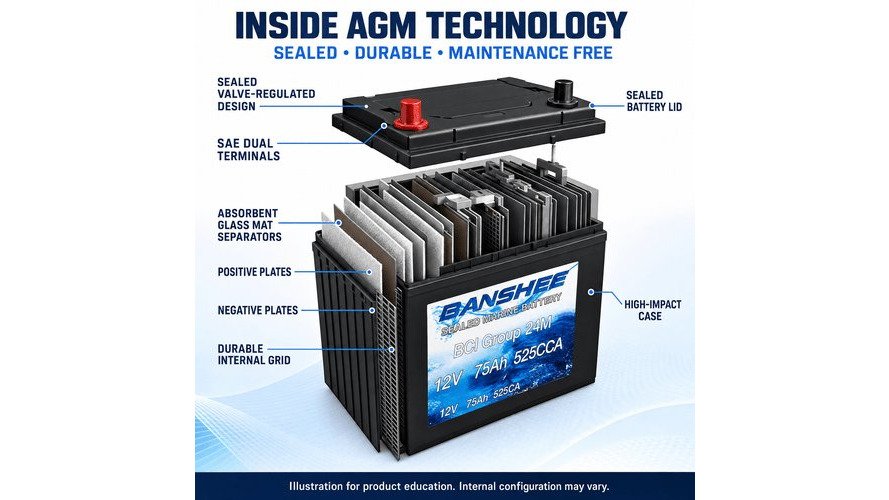
The beeping typically means one of three things: the battery is failing, power has been lost, or a mechanical component isn't working. According to research on sump pump battery lifespan, lead-acid batteries last 3 to 5 years, AGM batteries 4 to 6 years, and lithium-ion batteries over 10 years. Most homeowners don't know their battery's age until the beeping starts.
This guide walks you through the seven most common causes of sump pump battery beeping, how to diagnose each one, and what to do about it.
Low or Aging Battery Charge
The most common reason a sump pump battery backup beeps is that the battery is running low or has aged past its effective lifespan.
How battery age affects performance
Battery degradation happens gradually. A lead-acid battery that's three years old might power your pump for 6 hours on a full charge. By year five, that same battery might only run the pump for 2 hours before voltage drops too low. The backup system detects this voltage drop and triggers an alarm.
Lithium-ion batteries degrade more slowly than lead-acid or AGM options, which is why they cost more upfront. Temperature swings in basements accelerate the chemical reactions inside the battery, shortening lifespan.
Most standard backup systems provide 5 to 7 hours of continuous pumping on a full charge, according to battery backup sump pump runtime data. If your system beeps after just 2 or 3 hours of power outage, the battery is likely past its prime.
Signs your battery is losing capacity
Before the beeping starts, warning signs appear. The charger might take longer to bring the battery to full charge. The pump might run more slowly during a test cycle. Some systems show a low-battery indicator on the control panel before the audible alarm activates.
If your backup system is more than four years old and you've never replaced the battery, that's your answer. A replacement will restore the system to full performance and silence the alarm.
Power Loss or AC Failure Triggering Backup Mode
When your home loses electrical power, the backup system automatically switches from AC to battery power. This transition can trigger a beep as a notification that the system is now running on stored energy.
Some backup systems emit a single beep when they switch to battery mode. Others beep periodically while operating on DC power to remind you that the main pump is offline. This is normal behavior.
However, if the beeping continues after power is restored, or if it starts beeping during normal operation when power hasn't been lost, something else is wrong. Check your circuit breaker to confirm AC power is reaching the backup system. A tripped breaker will cut power to the charger, preventing the battery from recharging after it drains.
If the breaker hasn't tripped but power is still off, test the outlet itself with a simple lamp or phone charger. A dead outlet means the problem is upstream, either a fault in the home's wiring or a failure in the electrical panel. Call a licensed electrician to diagnose this.
Loose or Corroded Battery Terminals and Wiring
Corrosion at the battery terminals or loose cable connections block the flow of electricity, causing voltage drops that trigger the alarm. A corroded terminal looks like crusty white, blue, or green buildup around the connection point.
How to inspect connections safely
Before you touch anything, turn off the AC power to the backup system at the circuit breaker. Wait a few minutes to ensure any residual charge has dissipated.
Examine the battery terminals closely. Look for white, blue, or green crusty buildup. Check where the cables connect; they should be tight, not loose or wiggling. If you see corrosion, use a small wire brush to gently scrub the terminal until it's clean and shiny. Tighten any loose cable connections with a wrench.
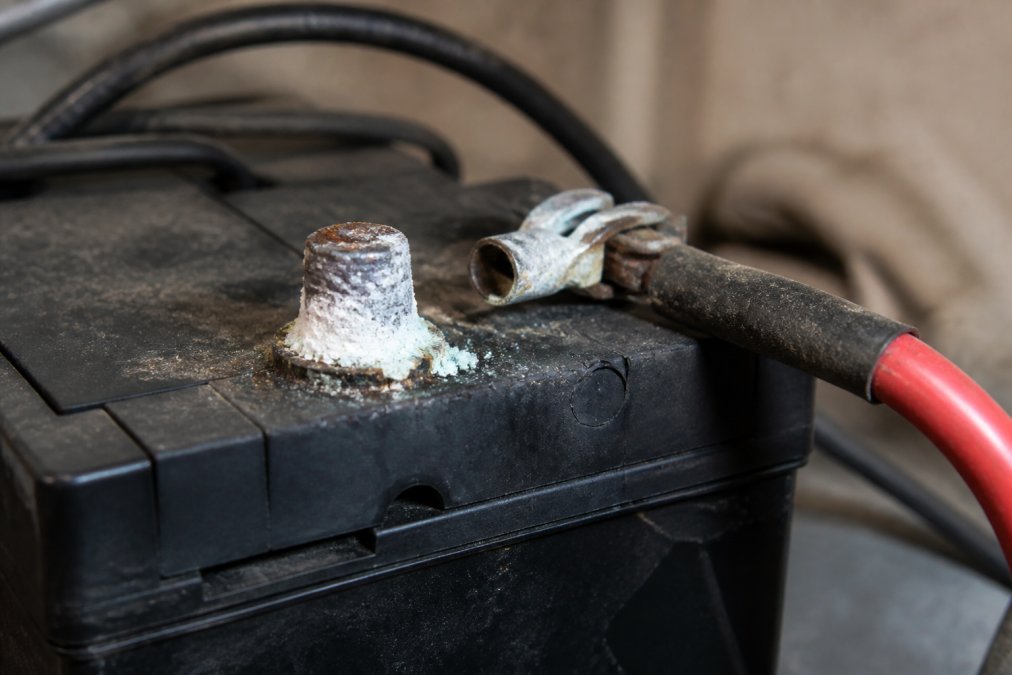
Corrosion happens fastest in humid basements. After cleaning the terminals, apply a thin coat of dielectric grease to prevent future corrosion. This takes two minutes and prevents hours of troubleshooting later.
If the terminals are severely corroded or the wiring is damaged, the battery may need replacement. Corroded terminals can't reliably conduct electricity.
How to Test Your Sump Pump Backup Battery
Testing your backup system is the fastest way to identify whether the beeping is a real problem or a false alarm.
Step 1: Check the battery voltage
Purchase an inexpensive multimeter from any hardware store for under $20. Set it to measure DC voltage. Touch the red probe to the positive terminal and the black probe to the negative terminal.
A healthy lead-acid battery should read between 12.6 and 13.2 volts. AGM batteries typically read 12.8 to 13.4 volts. Lithium-ion batteries should be at or near their rated voltage, usually 12.8 volts or higher. If the reading is below 12 volts, the battery is too weak to power the pump effectively. handling basement flooding.
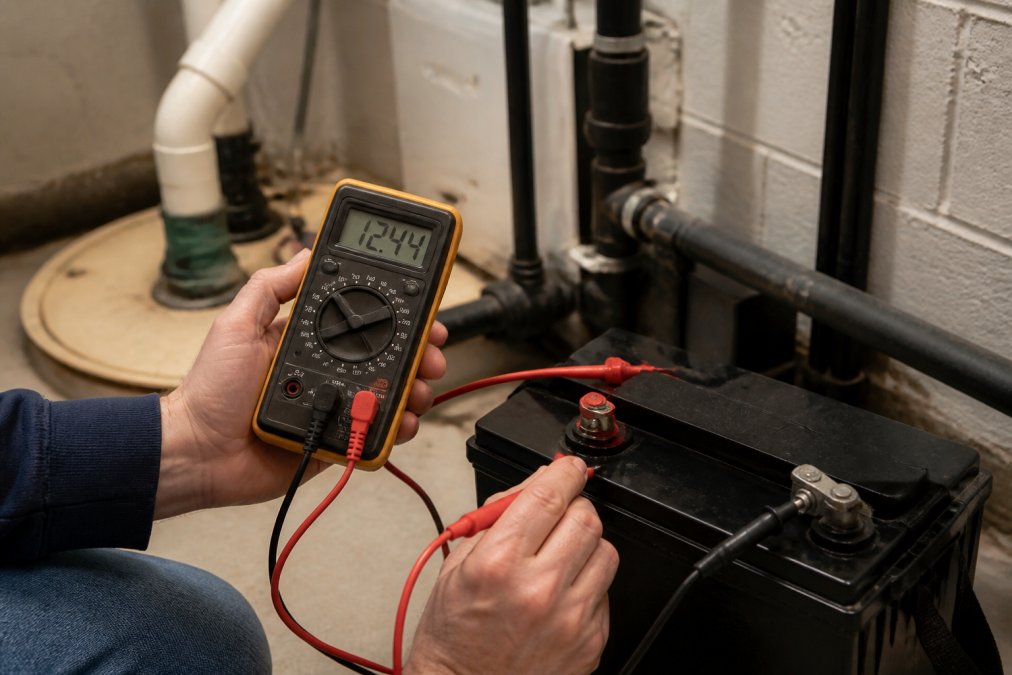
Write down the voltage. If you test again in a few months, you can track whether the battery is losing capacity over time.
Step 2: Test the float switch and pump cycle
Unplug the primary pump from its outlet. Pour a bucket of water into the sump pit to raise the water level. The backup system should activate automatically, and you should hear the pump running.
Let the pump run for a minute, then stop adding water. The pump should shut off when the water level drops. If the pump doesn't activate, the float switch is stuck or the backup system isn't wired correctly. If the pump activates but the low-battery alarm sounds immediately, the battery voltage is too low to sustain the pump.
This simple test catches most problems. If your backup system passes this test, it will likely perform during an actual outage.
Step 3: Verify the charger is working
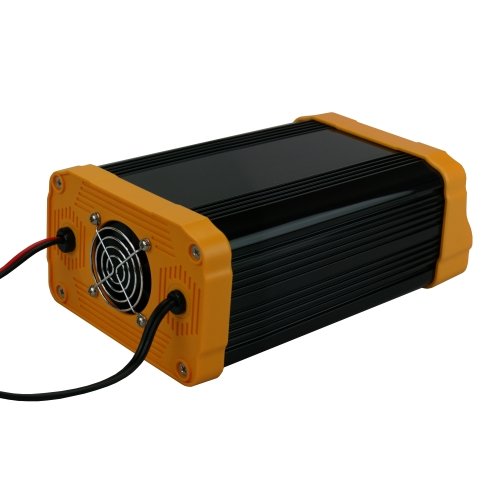
After the test, plug the primary pump back in and leave the backup system unplugged from AC power for one hour. Then plug it back in and check the voltage again after 30 minutes.
If the voltage has risen toward the normal range, the charger is working. If it hasn't changed or has dropped further, the charger is faulty and needs replacement.
How to Reset Your Backup Sump Pump Alarm
Most backup systems have a reset button that silences the alarm after you've addressed the underlying problem.
Finding and pressing the reset button
The reset button is typically located on the control panel or directly on the battery backup unit. It's usually a small red or black button, sometimes recessed so you need a pen or paperclip to press it. Check your system's manual for the exact location; the manufacturer's website usually has a PDF version if you've lost it.
Press the reset button for 2 to 3 seconds. The alarm should stop. If it doesn't, the problem isn't solved yet. The system is still detecting a fault.
When resetting doesn't stop the beep
If the alarm resumes within minutes of resetting, the battery, charger, or pump itself has a real problem. Don't ignore a beep that keeps coming back. Test the battery voltage again. Check the charger. Inspect the float switch for debris or corrosion. One of these components is failing, and only replacement can fix it.
Other Common Causes: Float Switch, Clogged Discharge, and Water Level
Beyond battery and power issues, three mechanical problems frequently trigger sump pump alarms.
Float switch stuck or damaged
The float switch rises and falls with the water level. When water rises, the float goes up and triggers the pump to run. When water drops, the float goes down and the pump shuts off.
A stuck float switch won't activate the pump, so water levels rise and the high-water alarm sounds. Debris, sand, gravel, or sediment can jam the float. Corrosion can freeze it in place. Check inside the sump pit and look for the float mechanism. Clear away any visible debris. If the float is corroded or cracked, it needs replacement.
Discharge pipe clogged or frozen
The discharge pipe carries water away from your home after the pump ejects it. If this pipe is clogged with debris or frozen solid during winter, water backs up into the sump pit and the water level rises, triggering the alarm.
Walk to where your discharge pipe exits your home. Is water flowing out? If not, the pipe is blocked. Clear any visible debris. In winter, check for ice formation around the exit. If the pipe is frozen, pour warm water around the exit to thaw it.
High water level in the sump pit
Sometimes the alarm is telling you the truth: water in the pit has risen too high. This happens when the primary pump fails, when the discharge pipe is blocked, or when water is entering the pit faster than the pump can remove it.
Check the water level in the pit. Is it higher than normal? If so, the pump isn't keeping up. Test the primary pump by plugging it in and listening for it to run. If it doesn't run, it's failed and needs replacement. If it runs but water still rises, the discharge pipe is probably clogged.
When to Replace Your Battery and Maintenance Tips
Battery replacement is inevitable. The question is whether you replace it on your schedule or when it fails during a storm.
Battery replacement timeline
Lead-acid batteries should be replaced every 3 to 5 years. AGM batteries every 4 to 6 years. Lithium-ion batteries can last over 10 years, according to battery lifespan research, but they cost more upfront.
Don't wait for the beeping to start. Mark your calendar three years after installation. When that date arrives, test the battery voltage. If it's below 12 volts or if you notice the pump runs more slowly than it used to, replace the battery. A proactive replacement guarantees your backup system will work when you need it.
Annual testing and preventive maintenance
Annual testing can extend the reliable lifespan of a backup battery by identifying degradation before a crisis occurs, according to battery backup maintenance guidelines. Test your system twice a year: once in spring and once in fall, before severe weather arrives.
Clean the battery terminals annually. Check for corrosion and tighten any loose connections. Inspect the float switch for debris. Verify the discharge pipe isn't clogged. These simple steps take 30 minutes and prevent most problems.
Keep a log of your test results. Note the battery voltage, pump runtime, and any issues you find. This record helps you spot trends.
| Maintenance Task | Frequency | Time Required | Impact |
|---|---|---|---|
| Test battery voltage | Twice yearly | 5 minutes | Catches degradation early |
| Clean terminals | Annually | 10 minutes | Prevents corrosion failures |
| Test pump cycle | Twice yearly | 10 minutes | Confirms system readiness |
| Inspect float switch | Annually | 5 minutes | Prevents false alarms |
| Check discharge pipe | Annually | 5 minutes | Prevents water backup |
A sump pump battery backup that beeps is doing its job, alerting you to a problem before it becomes a crisis. Most beeping is caused by a battery nearing the end of its life or a simple connection issue. Test the voltage, clean the terminals, and verify the charger is working. If the beeping persists, the battery needs replacement. At Bigtime Battery, we stock deep cycle batteries for sump pump backup systems in multiple chemistries and capacities. Whether you need a lead-acid, AGM, or lithium-ion replacement, we can help you find the right battery for your system and get your backup running reliably again.
=== FAQ ANSWERS (audit these too, same rules) ===
[1] Q: How do I know if my sump pump battery backup is actually dead or just beeping? A: A beeping alarm doesn't always mean the battery is dead, it often signals low charge, aging, or a power issue. Test the voltage with a multimeter: a healthy lead-acid battery reads 12-13 volts, while AGM batteries hold 12.8-13.2 volts. If voltage is below 12 volts, the battery is weak or failing. If voltage is normal but beeping continues, the issue is likely a loose connection, failed charger, or float switch malfunction rather than a dead battery.
[2] Q: How long does a sump pump battery backup last before it needs replacement? A: Lead-acid batteries typically last 3 to 5 years, AGM batteries last 4 to 6 years, and lithium-ion batteries may last over 10 years. Lifespan depends on how often the battery cycles, ambient temperature, and maintenance. Frequent power outages or deep discharges shorten lifespan. Annual testing can extend reliable life by catching degradation early. If your battery is older than 5 years and beeping frequently, replacement is likely overdue.
[3] Q: Can I silence the alarm without fixing the underlying problem? A: You can press the reset button to silence the alarm temporarily, but the beep will return if the root cause isn't addressed. Silencing the alarm without fixing loose terminals, low charge, or a failing battery leaves your home unprotected during power outages. Always diagnose why the alarm is sounding, test connections, check voltage, and verify the pump runs, before assuming the alarm is a false alert.
[4] Q: What's the difference between a 'low battery' beep and a 'pump failure' beep? A: Low battery beeps are usually periodic or continuous soft tones alerting you to low voltage or aging. Pump failure beeps are often louder or more urgent and indicate the backup pump ran but couldn't keep up with water level, or the primary pump failed and the backup is now active. Check water level in the sump pit: if it's high, the pump isn't draining properly. If the pit is empty or normal, the beep likely signals a battery or charger issue, not pump failure.
Frequently Asked Questions
How do I know if my sump pump battery backup is actually dead or just beeping?
A beeping alarm doesn't always mean the battery is dead, it often signals low charge, aging, or a power issue. Test the voltage with a multimeter: a healthy lead-acid battery reads 12-13 volts, while AGM batteries hold 12.8-13.2 volts. If voltage is below 12 volts, the battery is weak or failing. If voltage is normal but beeping continues, the issue is likely a loose connection, failed charger, or float switch malfunction rather than a dead battery.
How long does a sump pump battery backup last before it needs replacement?
Lead-acid batteries typically last 3 to 5 years, AGM batteries last 4 to 6 years, and lithium-ion batteries may last over 10 years. Lifespan depends on how often the battery cycles, ambient temperature, and maintenance. Frequent power outages or deep discharges shorten lifespan. Annual testing can extend reliable life by catching degradation early. If your battery is older than 5 years and beeping frequently, replacement is likely overdue.
Can I silence the alarm without fixing the underlying problem?
You can press the reset button to silence the alarm temporarily, but the beep will return if the root cause isn't addressed. Silencing the alarm without fixing loose terminals, low charge, or a failing battery leaves your home unprotected during power outages. Always diagnose why the alarm is sounding, test connections, check voltage, and verify the pump runs, before assuming the alarm is a false alert.
What's the difference between a 'low battery' beep and a 'pump failure' beep?
Low battery beeps are usually periodic or continuous soft tones alerting you to low voltage or aging. Pump failure beeps are often louder or more urgent and indicate the backup pump ran but couldn't keep up with water level, or the primary pump failed and the backup is now active. Check water level in the sump pit: if it's high, the pump isn't draining properly. If the pit is empty or normal, the beep likely signals a battery or charger issue, not pump failure.