 how-to guide
How to Identify Battery Model: Complete Guide
Table of Contents
- Why Knowing Your Battery Model Number Matters
- How to Identify Battery Model: Physical Label Methods
- Laptop Battery Model Number Lookup Methods
- Car Battery Model Numbers Meaning Explained
- How to Read Battery Specifications and Standards
- Battery Identification Chart and Common Types
- Identifying Batteries Without Physical Access
- Troubleshooting Common Battery Identification Issues
- Frequently Asked Questions
How to Identify Battery Model: Complete Guide
Last Updated: July 30, 2026
Knowing how to identify battery model numbers is essential whether you're replacing a dead battery in your laptop, finding the right power source for your boat, or restocking emergency lighting systems for your commercial property. This guide walks you through every practical method for identifying batteries, from reading physical labels to using manufacturer tools, so you can order the right replacement the first time.
Why Knowing Your Battery Model Number Matters
Your battery model number tells you the chemistry (lithium-ion, lead-acid, alkaline, etc.), voltage, capacity (amp-hours or watt-hours), physical dimensions, and terminal configuration. Order the wrong model and you risk device damage, safety hazards, or a battery that won't fit or power your equipment. A battery labeled "12V 100Ah" might look interchangeable with another 12V 100Ah battery, but differences in terminal placement, physical dimensions, or internal protection circuits can make all the difference.
How to Identify Battery Model: Physical Label Methods
The easiest way to identify a battery is to examine it directly. Most batteries have labels, stickers, or engraved information printed on the case.
Reading the Battery Label and Sticker
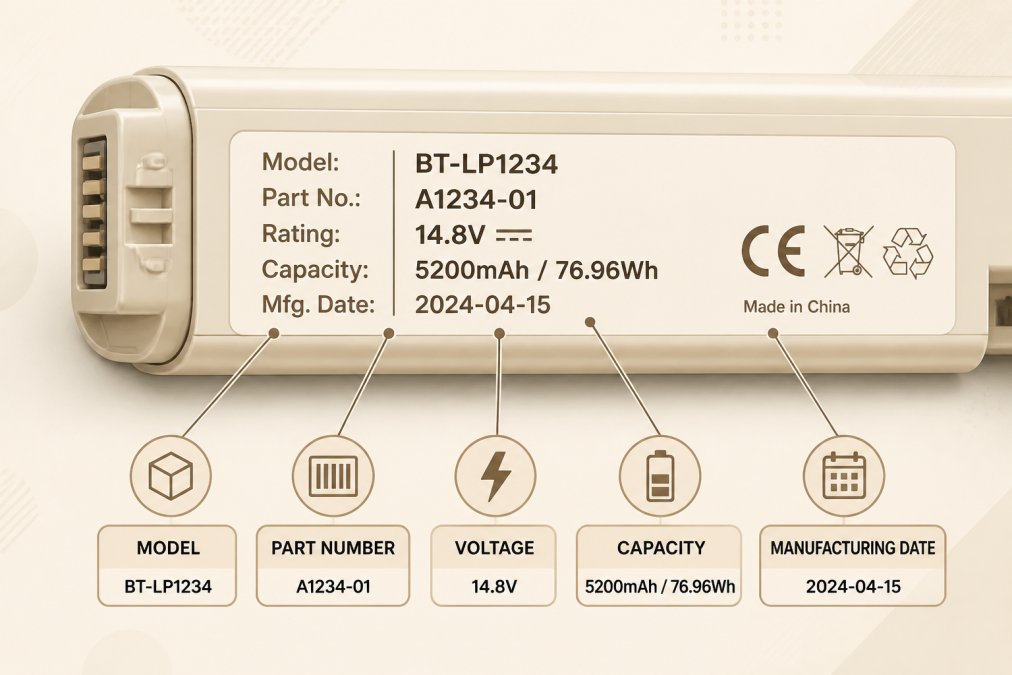
Start by examining the battery itself for a label, sticker, or printed information showing the manufacturer name, model number, and specifications. The model number is typically printed prominently near the top or on one of the flat sides. You'll also see voltage (V), capacity in amp-hours (Ah) or milliamp-hours (mAh), and often a manufacturing date. For car batteries, look for the BCI Group size and Cold Cranking Amps (CCA) rating. For laptop batteries, the label includes the manufacturer (Dell, HP, Lenovo, Apple), part number, and Wh (watt-hour) capacity.
Common label locations include the battery case itself, a white or silver sticker on one side, the battery terminal cover, or inside the battery compartment. Write down or photograph every number and letter you see. The model number is usually alphanumeric, like "BL-4C" (Nokia phone battery) or "SLA12-100" (sealed lead-acid battery).
Understanding Engraved or Stamped Information
Some batteries, especially industrial or OEM batteries, have information engraved or stamped directly into the plastic case. This information is often more durable than printed labels. Look for raised or indented text on the battery surface from different angles or under bright light. Engraved information typically includes the model number, voltage, capacity, and manufacturing date. Take your time reading engraved text and photograph it from multiple angles if lighting is poor.
Laptop Battery Model Number Lookup Methods
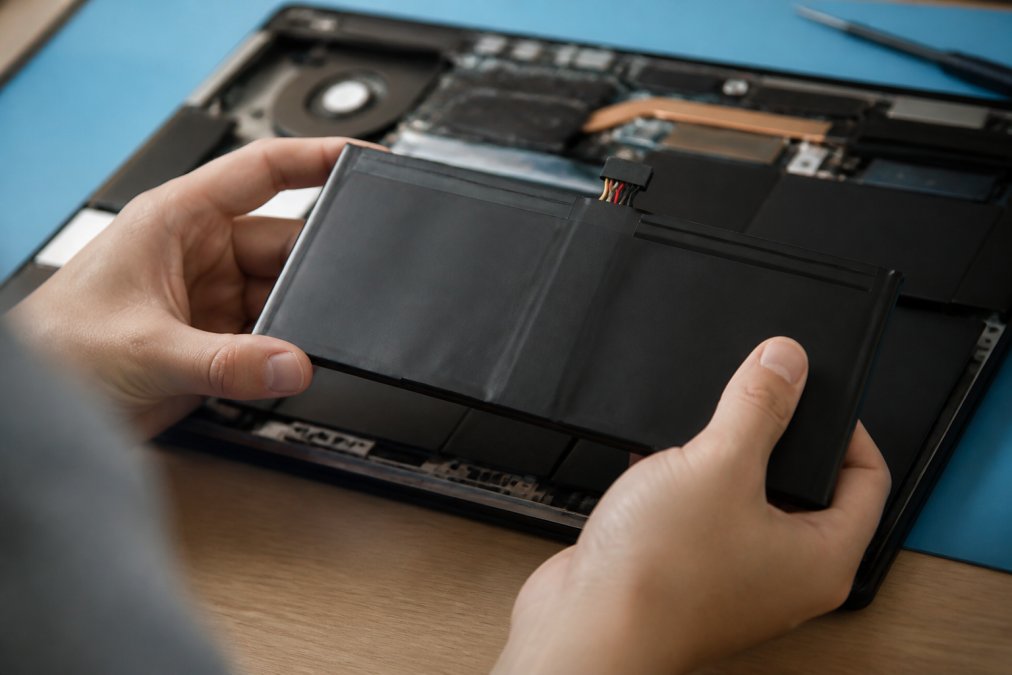
Laptop batteries are internal components. If your laptop is powered on and the battery is accessible, you can use software methods. Otherwise, physically remove the battery to read its label.
Using Device Manager and BIOS Setup
Windows laptops store battery information in Device Manager. Open Device Manager by pressing Windows Key + X and selecting "Device Manager," then expand the "Batteries" category. Right-click and select "Properties," then check the "Details" tab. For more detailed information, access your BIOS setup by restarting your laptop and pressing the BIOS key (usually F2, F10, or Delete) during startup, then navigate to the "System Information" or "Power" section.
Running the Battery Report Command
Open Command Prompt as Administrator and type:
powercfg /batteryreport
Press Enter. Windows generates an HTML file called "battery-report.html" and saves it to your user folder. Open this file in your web browser. The report displays the battery's design capacity, full charge capacity, cycle count, and critically, the battery model number. For Mac laptops, hold the Option key and click the battery icon in the menu bar, or open System Information (Apple menu > About This Mac > System Report) and look under "Power" for battery details.
Checking Manufacturer Websites (Dell, HP, Lenovo, Apple)
If you know your laptop model but not the battery part number, visit the manufacturer's website and search for your specific laptop model. Navigate to the "Specifications" or "Support" section and look for battery information. Dell SupportAssist and HP Support Assistant tools generate detailed hardware reports that include battery information.
Car Battery Model Numbers Meaning Explained
Car batteries use a standardized naming system defined by the Battery Council International (BCI).
BCI Group Size and CCA Ratings
The BCI Group size is a two-digit or three-digit number (like "24F" or "35") that indicates the battery's physical dimensions and terminal placement. Cold Cranking Amps (CCA) measures how many amps the battery can deliver at 0°F for 30 seconds. This is critical for cold climates. A battery rated for 600 CCA will start your car more reliably in winter than one rated for 400 CCA. The model number typically includes the BCI Group size and CCA rating. For example, "Group 24F 700 CCA" tells you the physical size, terminal configuration (F = front terminals), and cold-weather starting power.
Reserve Capacity and Amp-Hours
Reserve Capacity (RC) measures how long a battery can power essential vehicle systems if the alternator fails, measured in minutes. Amp-Hours (Ah) is another measure of capacity. A 12V car battery might be rated 50Ah, meaning it can theoretically deliver 1 amp for 50 hours, or 50 amps for 1 hour. When ordering a replacement, match both the BCI Group size and the RC or Ah rating.
How to Read Battery Specifications and Standards
Once you have the model number, understanding the specifications helps you verify compatibility.
Voltage, Capacity, and Chemistry Codes
Voltage must match your device exactly. Most consumer batteries are 1.5V (alkaline AA/AAA), 3.7V (lithium-ion), 6V, 12V, or 24V. Capacity is measured in amp-hours (Ah) for larger batteries or milliamp-hours (mAh) for smaller ones. A battery rated 2500 mAh is the same as 2.5 Ah. Watt-hours (Wh) accounts for both voltage and amp-hours: Wh = Voltage × Ah. A 12V 100Ah battery is 1200Wh.
Chemistry codes tell you the battery type:
- Li-ion (Lithium-ion): High energy density, used in laptops, phones, power tools
- Alkaline: Single-use, common in flashlights and remote controls
- Lead-Acid: Heavy but reliable, standard in cars
- NiMH (Nickel-Metal Hydride): Rechargeable, used in some power tools
- NiCd (Nickel-Cadmium): Older rechargeable type, less common now
You cannot substitute one chemistry for another in the same device.
IEC, JIS, and DIN Standard Designations
International standards help identify batteries across different manufacturers. The IEC (International Electrotechnical Commission) standard defines battery sizes like AA, AAA, C, D, and 9V. The IEC code for an AA battery is "LR6" (alkaline) or "HR6" (rechargeable). JIS (Japanese Industrial Standards) and DIN (German Industrial Standards) are regional standards that sometimes overlap with IEC but use different naming.
Battery Identification Chart and Common Types
Understanding the physical shapes and chemistries of common batteries helps you identify what you're looking at, especially if the label is illegible.
Cylindrical, Prismatic, and Coin Cell Batteries
Cylindrical batteries are the classic shape: AA, AAA, C, D, and 9V batteries. An AA is 14.5mm diameter by 50.5mm height. An AAA is 10.5mm by 44.5mm. Prismatic batteries are rectangular, like those in laptop computers, power banks, and cordless power tools. Coin cell batteries are small, flat, and round, used in watches, hearing aids, and small medical devices. Common sizes include CR2032, CR2025, and LR44.
Li-ion, Alkaline, Lead-Acid, NiMH, and NiCd Chemistries
Lithium-ion (Li-ion) batteries dominate modern electronics with high energy density and are used in laptops, phones, power tools, and electric vehicles. They're rechargeable with a lifespan of 300-500 charge cycles. Alkaline batteries are single-use, disposable cells common in AA, AAA, C, and D sizes, providing 1.5V per cell. Lead-acid batteries are heavy and bulky but extremely reliable, standard in cars, boats, and backup power systems. A lead-acid cell provides 2V, so a 12V battery has six cells. Nickel-Metal Hydride (NiMH) batteries are rechargeable and common in older cordless power tools, providing 1.2V per cell. Nickel-Cadmium (NiCd) batteries are older rechargeable cells, now mostly phased out due to environmental concerns.
Identifying Batteries Without Physical Access
Sometimes you can't remove the battery to read its label. This is common with sealed devices like modern smartphones and some laptops.
Sealed Devices and Internal Batteries
If the device is sealed, start by checking the device's documentation. The original box, user manual, or warranty card often lists the battery model number and specifications. Next, check the manufacturer's website by entering your device model number into their support page or battery finder tool. For medical devices (AED units, portable oxygen concentrators, patient monitors), contact the device manufacturer directly.
Using Manufacturer Resources and Customer Support
Most major device manufacturers maintain battery finder tools on their websites. For example, if you have a Lenovo laptop but can't access the battery, visit Lenovo's support page, enter your laptop's serial number or model number, and the system displays the compatible battery part number and capacity. For older or less common devices, manufacturer customer support is your best option. Call or email the manufacturer with your device model number and serial number.
Troubleshooting Common Battery Identification Issues
Even with the methods above, you might encounter challenges.
Worn or Illegible Labels
If the label is faded, peeling, or partially worn away, try different lighting angles. Shine a flashlight at a low angle across the battery surface to highlight raised text and make faded printing more visible. If the battery is still in your device, use software methods (Device Manager, BIOS, battery report command for laptops; manufacturer websites for other devices). Check if there's any text on the battery compartment cover or the device itself. Contact the device manufacturer with your device model and serial number. If you absolutely need to identify the battery, measure its physical dimensions (length, width, height, diameter) and voltage and provide these measurements to a battery retailer.
Mismatched or Generic Part Numbers
Sometimes a battery label shows a generic part number that doesn't match any official model. If you encounter a generic or unrecognized part number, note down all other information: voltage, capacity (Ah or Wh), physical dimensions, and chemistry type. Then search for batteries matching these specifications. Contact the device manufacturer with your device model and ask for the OEM (original equipment manufacturer) battery part number.
Identifying Swollen or Damaged Batteries
A visibly swollen, cracked, or leaking battery should not be used. Swelling indicates internal chemical breakdown, usually in lithium-ion batteries, and is a fire and explosion hazard. Do not attempt to identify a damaged battery for reuse. Instead, safely dispose of it according to local regulations. Most retailers like Best Buy, Home Depot, and Batteries Plus accept old batteries for recycling.
Identifying your battery model correctly saves time, money, and frustration. Whether you're reading a physical label, using device software, or contacting manufacturer support, the methods in this guide cover every common scenario. When you have the exact model number, ordering the right replacement becomes straightforward.
Bigtime Battery serves as your premier one-stop shop for all single-cell battery requirements. We specialize in providing high-quality replacement batteries for a vast array of devices, ensuring you always have the power you need at competitive prices. Whether you are looking for medical, marine, or specialty batteries, our trusted selection delivers reliable performance for every application. Once you've identified your battery model using the methods above, you can search our inventory by model number, voltage, capacity, or device type. Our team is ready to help you find the perfect match and get it shipped to you quickly.
Frequently Asked Questions
How do I find the model number of a battery if the label is worn off?
If the physical label is illegible, check your device's documentation, original packaging, or receipt. For laptops, use Device Manager or the powercfg /batteryreport command to find the part number. For cars, contact your vehicle manufacturer with your VIN (Vehicle Identification Number). For specialty batteries, reach out to the original equipment manufacturer (OEM) with photos of the battery or your device. Some retailers, including Bigtime Battery, offer customer service support to help identify batteries even without clear labeling.
What do the numbers and letters on a battery mean?
Battery designations vary by type and standard. For example, an AA battery follows the IEC standard, while car batteries use BCI Group sizes (like 24F or H6). Laptop batteries display part numbers like 'A1245' (Apple) or 'PA5109U' (Toshiba). Numbers typically represent voltage (V), capacity in Amp-Hours (Ah) or milliamp-hours (mAh), and cold cranking amps (CCA) for automotive batteries. Letters often indicate chemistry (Li-ion, NiMH, Lead-Acid) or manufacturer codes. Reading the full label reveals voltage, capacity, chemistry, and replacement compatibility.
How can I identify the battery type and chemistry without opening my device?
Check your device's user manual or manufacturer website, they always list battery chemistry and specifications. For laptops, use Device Manager on Windows or System Report on Mac. For cars, look at the battery case itself or check your owner's manual. For sealed devices like phones or tablets, visit the manufacturer's support page and enter your model number. The battery chemistry (Li-ion, Alkaline, NiMH, etc.) is always documented by the OEM. Never attempt to open sealed devices to access internal batteries, as this may damage them or void your warranty.
Why is it important to identify the correct battery model before ordering a replacement?
Ordering the wrong battery model can result in incompatibility, poor performance, or device damage. Different devices require specific voltage, capacity (Ah or mAh), and chemistry. For example, a laptop that needs a 52.5Wh Li-ion battery cannot use a 44Wh replacement without performance loss. Car batteries must match your vehicle's BCI Group size and CCA rating for proper starting power. Using an incorrect battery also voids warranties and may create safety hazards. Identifying the correct model number ensures you purchase the right replacement, avoid costly downtime, and maintain device reliability and longevity.