 how-to guide
How to Find Battery Model Number: Complete Identification Guide
Table of Contents
- Why Your Battery Model Number Matters
- How to Find Battery Model Number: Physical Label Methods
- Battery Part Number vs Model Number Explained
- Software-Based Identification Using System Tools
- Laptop Battery Model Number Lookup by Brand
- Car Battery Model Number Explained
- Ensuring Replacement Battery Compatibility
- Common Mistakes to Avoid When Identifying Batteries
- Frequently Asked Questions
How to Find Battery Model Number: Complete Identification Guide
Last Updated: July 29, 2026
Knowing how to find battery model number is essential whether you're replacing a laptop battery, powering a medical device, or maintaining a backup power system. At Bigtime Battery, we help thousands of customers identify the exact battery they need every month. A mismatch between your device and replacement battery can mean wasted time, money, and potentially damaged equipment. This guide shows you exactly how to find battery model number using physical inspection, software tools, and manufacturer resources.
Why Your Battery Model Number Matters
Your battery model number is the universal identifier that connects your device to its power source. Unlike serial numbers (which identify a specific unit) or part numbers (which manufacturers use internally), the model number tells you the capacity, chemistry, voltage, and compatibility specifications.
Installing an incompatible battery can damage your device's charging circuitry, void warranties, or create safety hazards with lithium-ion batteries. Voltage mismatches are particularly dangerous; a battery rated for 11.1V powering a device designed for 14.8V causes permanent damage. The model number eliminates this ambiguity.
How to Find Battery Model Number: Physical Label Methods
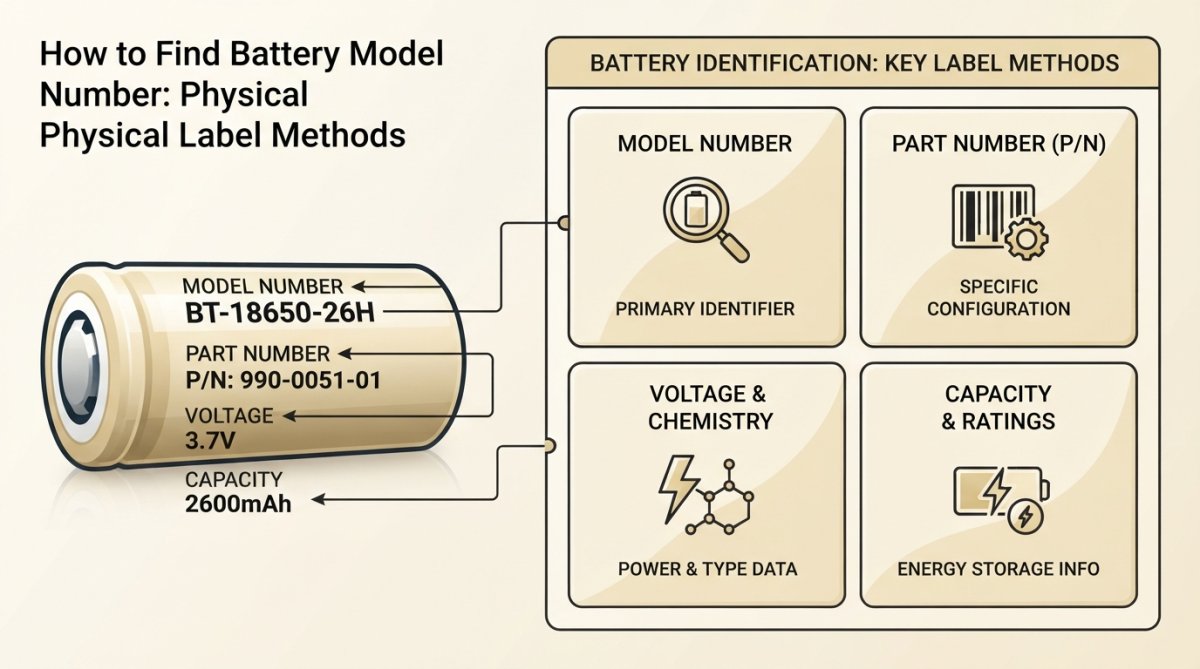
The easiest way to find battery model number is to locate the physical label on the battery itself.
Locating the battery label on external batteries
For external batteries and battery packs, the label is usually on the bottom or back surface:
-
Power banks and portable batteries: Flip the device over. The label is typically on the underside. Focus on the number labeled "Model" or "Model No." (like "PB-2000A" or "BP-5000").
-
Camera batteries: Check the back of the battery. Most display model numbers like "LP-E6N" (Canon) or "EN-EL15" (Nikon).
-
Cordless tool batteries: The label is on the side or back. DeWalt batteries display "DCB" followed by numbers; Makita batteries show "BL" or "BT" designations.
-
Flashlight and portable device batteries: Check the cylindrical side or bottom cap for the model number printed in small text.
The label also displays voltage (V), capacity in milliamp-hours (mAh) or watt-hours (Wh), and chemistry type (Li-ion, NiMH, etc.). Write down all this information for verification.
Checking under the laptop chassis for internal batteries
Laptop batteries are built into the device. You have two options: remove the battery physically or access the information through software.
To physically locate your laptop battery model number:
-
Power down completely and unplug the power adapter.
-
Flip the laptop upside down. Most laptops have a removable battery accessible from the bottom panel with a latch or release button.
-
Slide or press the latch to eject the battery. Some models require unscrewing a panel first.
-
Read the label on the battery's top surface. The model number is printed here with voltage, capacity (Wh), and chemistry information. Dell batteries often show "JHYP2" or similar designations.
-
Reinsert carefully, ensuring the battery clicks into place.
If your laptop has a non-removable battery, use the software methods in the next section.
What to do if the label is faded or missing
Worn or missing labels are frustrating, but backup options exist. Try these physical workarounds:
- Examine the battery housing carefully. Even faded labels sometimes reveal numbers under different lighting angles.
- Check for embossed numbers. Some manufacturers press the model number directly into the plastic rather than using a sticker.
- Look inside the device. Manufacturers sometimes print compatibility information on the device's internal surface.
If physical inspection yields nothing, proceed to software methods. For car batteries where the label is completely illegible, match the battery dimensions and terminal type to your vehicle's specifications.
Battery Part Number vs Model Number Explained
These terms get confused constantly, costing people money. Understanding the difference ensures you order the right replacement.
Model number is the universal identifier for a battery type. It tells you voltage, capacity, chemistry, and compatibility. Multiple units of the same model are identical. Example: "BP-511A" is Canon's model number for a specific battery type.
Part number is how the manufacturer catalogs that model internally. It might be the same as the model number or different. Part numbers often include codes for packaging, region, or bundled accessories. Example: Canon's part number might be "1010B002" while the model number is "BP-511A."
Serial number is unique to each individual battery unit. It's useful for warranty claims or tracking batch recalls, but tells you nothing about compatibility.
When ordering a replacement, always reference the model number. If you only have a part number, cross-reference it on the manufacturer's website to find the corresponding model number.
How to read battery specifications on the label
Voltage (V): This is critical. A battery rated for 3.7V cannot power a device designed for 11.1V. Match your device's voltage exactly.
Capacity (mAh or Wh): This measures how long the battery lasts. You can use a slightly higher capacity replacement safely (it'll last longer), but never go lower.
Chemistry: Lithium-ion (Li-ion), Nickel-Metal Hydride (NiMH), and Lithium Polymer (LiPo) are the main types. Chemistry determines charging requirements and safety protocols. Never mix chemistries in the same device.
Regulatory information: Look for FCC, CE, or UL markings. These certifications confirm the battery meets safety standards. Counterfeit batteries often lack these markings.
Software-Based Identification Using System Tools
When physical inspection isn't possible or the label is gone, your device's operating system stores battery information.
Using BIOS and system configuration to find battery info
For Windows laptops:
-
Open Command Prompt as Administrator.
-
Type this command:
powercfg /batteryreport -
Press Enter. Windows generates an HTML report saved to your user directory.
-
Locate the battery details section. You'll see design capacity, full charge capacity, model name, manufacturer, and serial number.
For Mac laptops:
-
Hold Option and click the battery icon in the top-right menu bar.
-
For the actual model number, open System Information. Go to Apple menu > About This Mac > System Report > Power.
-
Look for "Model Information."
For Linux systems, use cat /proc/acpi/battery/BAT0/info (replace BAT0 with your battery identifier if different).
These methods work even when the physical label is missing. The operating system queries the battery's internal chip, which stores manufacturer data.
Laptop Battery Model Number Lookup by Brand
Different manufacturers use different naming conventions.
Finding battery info for HP, Dell, and Lenovo laptops
HP laptops: HP battery model numbers typically start with "PR" or "MO" followed by numbers. Examples: "PR06" or "MO06XL." Power down, flip the laptop, and look for the removable battery, or check Settings > System > Battery if non-removable. Visit HP's support site and enter your model number.
Dell laptops: Dell uses alphanumeric designations like "JHYP2," "RJWH3," or "F62G0." Remove the battery if possible and read the label. If non-removable, open Dell's support page, enter your service tag (located on the bottom of the device), and the system will display your battery specifications.
Lenovo laptops: Lenovo battery model numbers often include "L," "45N," or "61+" prefixes. Examples: "L09M4P13" or "45N1018." Check the physical battery if removable. For non-removable batteries, use Lenovo's PSREF (Product Specifications Reference) tool.
Using manufacturer support websites and service tags
Every major manufacturer maintains a battery compatibility database.
Step 1: Locate your device's service tag or model number (usually on the bottom or inside the battery compartment).
Step 2: Visit the manufacturer's support site.
Step 3: Enter your service tag or model number.
Step 4: Navigate to "Batteries" or "Power" in the parts list.
Step 5: Cross-reference the model number with the manufacturer's battery specifications sheet.
This approach is authoritative. You're pulling information directly from the manufacturer's database.
Car Battery Model Number Explained
Automotive batteries use a different identification system than electronics.
Decoding automotive battery labels and product numbers
Car battery labels display several key pieces of information:
Group size: This is a two or three-digit code (like "35," "65," or "78") that indicates the battery's physical dimensions and terminal layout. Group size is critical; a battery that doesn't fit the battery box won't work.
Cold Cranking Amps (CCA): This number (typically 400-1000) indicates how much current the battery can deliver at 0°F. Your vehicle's engine requires a minimum CCA rating.
Reserve Capacity (RC): Measured in minutes, this shows how long the battery can power your vehicle's essential systems if the alternator fails.
Amp-Hour (Ah) rating: This measures total energy storage capacity. A 50Ah battery stores more energy than a 40Ah battery.
Terminal type: Batteries have different terminal configurations (top-post, side-post, etc.). Your vehicle's cables must match exactly.
Model number: This is the manufacturer's unique identifier for that specific battery model.
When replacing a car battery, match the group size first. Then match or exceed the CCA rating for your climate.
Ensuring Replacement Battery Compatibility
Finding the model number is half the battle. Verifying that your replacement is actually compatible is the other half.
Matching voltage, capacity (mAh and Wh), and chemistry
Voltage must match exactly. A device designed for 11.1V cannot safely use a 14.8V battery. Check your device's original battery label and match that voltage precisely.
Capacity can be equal or higher. If your original battery is rated 5000mAh and you find a replacement rated 5200mAh, that's fine. However, never go lower.
Chemistry must match. Lithium-ion, Lithium Polymer, and Nickel-Metal Hydride batteries have different charging curves and safety requirements. Mixing chemistries can damage the device or create fire hazards.
Connector type matters for external batteries. A USB-C battery won't work with a Micro-USB device.
Create a checklist before ordering:
| Specification | Original Battery | Replacement Battery | Match? |
|---|---|---|---|
| Voltage (V) | Yes/No | ||
| Capacity (mAh/Wh) | Yes/No | ||
| Chemistry | Yes/No | ||
| Connector Type | Yes/No | ||
| Model Number | Yes/No |
Verifying OEM compatibility before ordering
OEM (Original Equipment Manufacturer) batteries are made by the device manufacturer or an authorized supplier. Third-party batteries are cheaper but may not meet the same standards.
Before ordering from any supplier, verify:
-
Is this an OEM battery or third-party? Genuine batteries cost more but carry manufacturer warranties.
-
Does the supplier provide a compatibility guarantee? Reputable sellers will accept returns if the battery doesn't work with your device.
-
Check the seller's reviews. Look for mentions of compatibility issues or dead-on-arrival batteries.
-
Verify the model number one final time. Cross-reference it on the manufacturer's official website.
-
Check the price. Suspiciously cheap batteries are often counterfeits. If one seller is 40% cheaper than others, that's a warning sign.
Bigtime Battery specializes in providing verified replacement batteries across medical, marine, and specialty device categories. We verify every battery's model number and specifications before shipping, and we accept returns if compatibility issues arise.
Common Mistakes to Avoid When Identifying Batteries
Mistake 1: Confusing serial number with model number. The serial number is unique to one unit. The model number applies to all units of that type. You need the model number for ordering.
Mistake 2: Reading only part of the label. Don't grab the first number you see. Look for "Model," "Model No.," or "Type" specifically.
Mistake 3: Assuming similar-looking batteries are compatible. Two batteries might look identical but have different voltage or capacity. Always verify the model number.
Mistake 4: Ignoring voltage completely. A voltage mismatch can damage your device or create fire hazards. Voltage is non-negotiable.
Mistake 5: Ordering based on capacity alone. Higher capacity is fine, but capacity without voltage is useless information.
Mistake 6: Trusting seller descriptions over manufacturer specs. If the model number doesn't match the manufacturer's database, it isn't compatible.
Mistake 7: Buying from unauthorized sellers. Counterfeit batteries are common. Purchase from the manufacturer, authorized retailers, or verified resellers only.
Finding the right battery starts with knowing how to find battery model number. Whether you're reading a physical label, using system tools, or consulting manufacturer databases, the process is straightforward once you know what to look for. The model number is your assurance that you're ordering the correct replacement.
When you're ready to order, Bigtime Battery provides verified replacement batteries with compatibility guarantees across medical, marine, and specialty device applications. We cross-reference every model number against manufacturer specifications before fulfillment, ensuring you get the right battery the first time. Start with your model number, verify compatibility using our resources, and order with confidence.
Frequently Asked Questions
Where is the model number located on a battery?
The battery model number is typically printed on a label affixed to the battery pack itself. For external batteries, check the bottom or side of the device. For laptop internal batteries, you'll need to remove the battery from the chassis to see the label on the pack. Car batteries display the model number on top or the side terminal post area. If the label is worn or missing, use system software or contact the manufacturer with your device's serial number for identification assistance.
What is the difference between battery part number and model number?
The model number identifies the specific battery type and design (e.g., what capacity, voltage, and chemistry it is), while the part number is a manufacturer's internal code for ordering and inventory. The model number appears on the label alongside specifications like voltage and mAh capacity. The part number may be different across manufacturers even for the same battery. Always provide both when ordering a replacement battery to ensure compatibility and avoid receiving the wrong product.
How do I find my laptop battery model number without removing it?
On Windows, open System Information (press Windows+Pause or search 'System Information'), then look for battery details in the hardware section, or use the battery report feature by running 'powercfg /batteryreport' in Command Prompt. On Mac, hold Alt and click the battery icon in the menu bar to see model information. Many manufacturers also provide online tools on their support pages, enter your laptop's service tag or serial number to retrieve battery specifications. If these methods don't reveal the full model number, removing the battery to check the physical label is the most reliable approach.
Why is it important to match the exact battery model number when ordering a replacement?
Using the correct battery model number ensures voltage, capacity (mAh or Wh), and chemistry compatibility with your device. Installing an incorrect battery can result in poor performance, reduced runtime, device damage, or safety hazards like overheating. Even batteries with the same voltage may have different capacities or connector types. Providing the exact model number to your supplier guarantees you receive an OEM or compatible replacement that meets regulatory standards and device specifications. This prevents costly downtime and potential warranty issues.