 How-to
How to Tell When an Industrial Battery Needs Replacing
Last Updated: November 5, 2026
Quick Summary
Replace an industrial battery when its warning signs start affecting daily work, such as runtime falling short of a full shift, repeated charging faults, or a steady drop in state of health. Physical damage, leaks, swelling, or excessive heat call for immediate removal from service. Load testing and regular logging help you spot these trends early.
- Replace the battery when warning signs affect daily work, not after it dies completely.
- Repeated charging faults, even after checking connections, can mean the battery is not accepting a full charge.
- Stop using any battery that shows swelling, cracks, leaks, corrosion, or excessive heat.
- A sharp drop in state of health or voltage under load signals the battery needs testing or replacement soon.
- Log load test results and state of health readings over time to reveal trends a single reading would miss.
Table of Contents
- Why Industrial Battery Replacement Timing Matters
- Runtime and Charging Warning Signs
- Physical Damage, Leaks, and Heat: Immediate Safety Signs
- Industrial Battery State of Health: What the Numbers Tell You
- Industrial Battery Load Testing: A Repeatable Procedure
- Industrial Battery Lifespan and Chemistry Differences
- Industrial Battery Maintenance Checklist and Replacement Decision Framework
- Booking Your Next Battery Replacement at Bigtime Battery
- Frequently Asked Questions
Why Industrial Battery Replacement Timing Matters
Most industrial battery failures do not happen all at once. They build up over weeks, and the warning signs are easy to miss. A battery that gets replaced late can cost more in downtime than the battery itself.
Industrial batteries power forklifts, floor scrubbers, pallet jacks, and golf carts that run long shifts every day. When one starts to fail, the whole operation slows down. Crews wait on chargers, equipment stops mid-task, and managers scramble to find backup power.
Here is the simple rule we recommend: replace a battery when its warning signs start to affect daily work, not after it dies completely. You can spot most problems early if you know what to look for. The sections below show you how.
Runtime and Charging Warning Signs
Runtime is usually the first thing that changes. A battery that once lasted a full shift starts running out early. Operators may notice the equipment slowing down near the end of the day, or they may need to swap batteries sooner than planned.
Watch for these signs:
- The battery runs out before the shift ends
- Charging takes noticeably longer than it used to
- The charger shows fault codes or stops and starts
- Voltage drops quickly under normal load
- The equipment loses power on hard lifts or long runs
A charging fault is one of the clearest signals. If a charger keeps flagging errors even after you check the connections, the battery may not be accepting a full charge. Do not ignore it. Repeated faults often point to a battery that has lost capacity.
Watch out: Do not keep running a battery that loses power under load. Sudden shutdowns on a forklift can cause tip-overs and injuries.
Physical Damage, Leaks, and Heat: Immediate Safety Signs
Some warning signs call for action right away. Physical damage and heat are the most serious, because they can lead to fires, leaks of corrosive acid, or sudden failure.
Stop using the battery and take it out of service if you see:
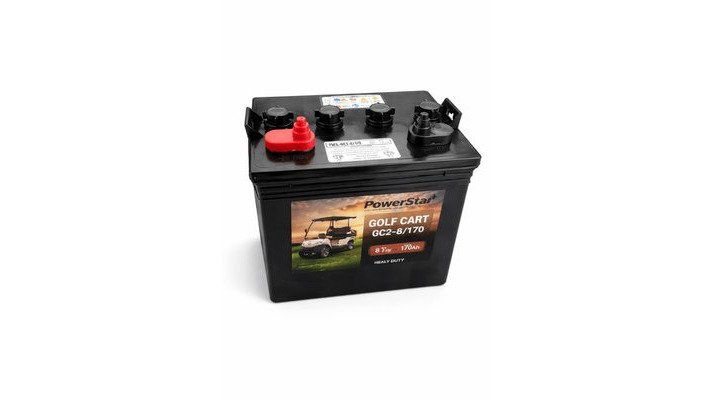
PowerStar Replacement T-105 6V Volt Deep Cycle Golf Cart, Solar, Marine, RV →
- Swelling, bulging, or a casing that looks pushed out of shape
- Cracks in the case or cover
- Electrolyte leaking from the vents or seams
- Corrosion or white, crusty buildup on terminals
- A rotten-egg smell near the battery
- Excessive heat during charging or operation
Immediate Response Steps
When any of these signs appear, follow a consistent sequence:
- Stop and isolate. Turn off the equipment, disconnect the charger, and move the battery away from other equipment and combustible material if it is safe to do so. Do not attempt to charge or load-test a damaged battery.
- Wear PPE. Put on eye protection, acid-resistant gloves, and a face shield if there is any chance of splashing. Keep a spill kit and eyewash station nearby.
- Ventilate. A rotten-egg smell can indicate a charging fault or overcharge producing hydrogen sulfide. Move the battery to a well-ventilated area away from open flames and ignition sources.
- Contain leaks. Use an acid-neutralizing spill kit or absorbent material. Do not use water on a lead-acid electrolyte spill unless your site procedure calls for dilution; follow your hazardous materials plan.
- Escalate. Notify a qualified battery technician or your site safety officer. Document the battery ID, the symptom, and the time so the failure can be traced.
Watch out: Never handle a swollen or hot battery with bare hands, and never stack or transport a damaged battery in an enclosed vehicle. A battery that is hot to the touch during charging may be overcharging or have an internal short, and it should be treated as a fire risk until a qualified person clears it.
Acid can damage skin and clothing, so clean any spill carefully and follow your site's hazardous materials procedures. Once a battery shows physical damage, heat, or a leak, it should be removed from service and not repaired. When you are ready to replace it, make your purchase at bigtimebattery.com.
Industrial Battery State of Health: What the Numbers Tell You
Battery state of health (SOH) describes how much of its original capacity a battery still holds. A battery at full health stores close to its rated capacity. As it ages, that capacity drops, and runtime falls with it.
Many operations track SOH through a battery management system or a regular capacity test. If your equipment or charger reports SOH, record it. A steady decline over several months is a clear sign of aging, even when the battery still seems to work.
Here is how to read the trend:
- Stable readings: The battery is aging normally. Keep monitoring it.
- Gradual decline: Plan a replacement within the next budget cycle.
- Sharp drop: Test the battery now and consider replacing it soon.
Looking at the numbers over time gives you a better picture than any single reading. One bad day may be a fluke. A downward trend is not.
Industrial Battery Load Testing: A Repeatable Procedure
A load test shows how a battery performs under real demand. Use the same method every time so your results can be compared across tests.

- Fully charge the battery and let it rest for several hours.
- Record the resting voltage with a calibrated meter.
- Apply a steady load that matches your normal operating draw, using the same load each time.
- Measure the voltage at set intervals during the load.
- Note how quickly the voltage falls and how long the battery holds above the minimum safe level.
- Log the results with the date, temperature, and battery ID.
Compare each test against your earlier results. A battery that drops voltage faster each month is losing capacity. Keep your records in one place so trends are easy to spot.
Always follow the battery maker's testing guidance and your site's safety rules. Never test a damaged battery.
Industrial Battery Lifespan and Chemistry Differences
Battery lifespan depends a lot on chemistry. Flooded lead-acid batteries need regular water top-ups and ventilation. Sealed lead-acid (SLA) batteries, including absorbed glass mat (AGM) designs, are maintenance-free and can be mounted in more positions.
Chemistry also affects how you judge health. A sealed battery gives you fewer visual clues, so you rely more on testing and charger data. A flooded battery shows low electrolyte and corrosion more clearly.
Match the battery to the job. A sealed battery suits a site where spills are a risk and maintenance time is limited.
PowerStar Replacement T-105 6V Volt Deep Cycle Golf Cart, Solar, Marine, RV →
For example, the PowerStar Replacement T-105 6V Deep Cycle battery and the 12V 80Ah Group 24 SLA rechargeable battery are both sealed lead-acid options.
Industrial Battery Maintenance Checklist and Replacement Decision Framework
Use this checklist during regular inspections, and log every result against the battery ID so trends are visible:
- Shift runtime is holding steady
- Charge cycles complete without faults
- No swelling, cracks, or leaks
- Terminals are clean and tight
- Temperature stays in a normal range during charging
- Load test results show no sharp decline
- State of health readings are stable or dropping slowly
- Electrolyte levels are correct (flooded lead-acid only)
- Charger and cables show no heat damage or loose connectors
Qualified Replacement Thresholds
There is no single universal cutoff, and limits vary by chemistry and manufacturer. Use the battery maker's published data to set replacement thresholds, since limits vary by chemistry and manufacturer:
- Capacity loss: As measured capacity falls below the rated amp-hour capacity, runtime loss becomes harder to schedule around. Confirm specific thresholds against the battery maker's published data.
- Internal resistance: A steady rise in internal resistance, measured with a conductance or resistance tester, signals grid corrosion or plate degradation. A sharp jump between tests is more urgent than a slow climb.
- Voltage under load: If voltage drops below the manufacturer's minimum safe level well before the expected run time, capacity is gone even if the battery still charges.
- Age: Expected service life varies by chemistry, duty cycle, and maintenance. Check the battery maker's published service-life data for planning.
Repair Versus Replace
Separate correctable problems from end-of-life failure before you spend money:
| Situation | Likely Cause | Action |
|---|---|---|
| Repeated charging faults, clean connections | Charger or cable fault | Test with a known-good charger before condemning the battery |
| Runtime loss, all cells even, no damage | Normal aging | Plan replacement in the next budget cycle |
| One weak cell or low electrolyte in flooded battery | Correctable maintenance issue | Service and retest; replace if capacity does not recover |
| Swelling, cracks, leaks, or heat | Internal damage | Remove from service immediately; do not repair |
| Sharp SOH or voltage drop | Plate or cell failure | Replace |
Lifecycle Cost Comparison
Replacement decisions should weigh more than the sticker price. Compare the cost of a new battery against the cost of continued downtime, extra battery swaps, labor for maintenance, and energy lost to inefficient charging. A battery that fails mid-shift can cost far more in lost productivity than the replacement itself. Keep a simple log for every battery: install date, test results, charge faults, and any damage. That record makes replacement decisions faster and easier to justify, and it helps you time purchases before a failure stops the operation. When the numbers point to replacement, make your purchase at bigtimebattery.com.
Booking Your Next Battery Replacement at Bigtime Battery
When your checklist shows that a battery needs replacing, you can make your purchase at bigtimebattery.com. Our team at Bigtime Battery helps you find a replacement that fits your equipment, voltage, and daily workload.
Start with the Find the Right Battery tool on our site at https://www.bigtimebattery.com/store/index.html. Compare sealed options like the PowerStar Replacement T-105 6V battery, priced at $595.88 for a 2-pack, and the High Rate 12V 80Ah Group 24 SLA battery at $223.26. The PowerStar T-105 is listed for deep-cycle use.
Replace batteries before they fail in the middle of a shift. Make your purchase at bigtimebattery.com and keep your equipment running.
Frequently Asked Questions
How do you know when it's time to replace an industrial battery?
Replacement is usually due when runtime drops noticeably below what the battery delivered when new, charging takes longer or shows faults, the casing swells or cracks, or electrolyte leaks appear. Any physical damage or leak is a reason to stop using the battery and replace it promptly. Gradual capacity loss is the most common reason, and a load test or state-of-health reading gives you a measurable basis for the decision rather than relying on feel alone. Track shift runtime over time so you can see the decline before it disrupts operations.
How long do industrial batteries typically last?
Lifespan depends heavily on battery chemistry, duty cycle, charging discipline, and operating temperature. Many flooded lead-acid industrial batteries are planned around a service life that is measured in charge cycles and years, and heavy daily cycling or repeated deep discharge shortens it. Keeping the battery charged, avoiding overheating, and performing regular maintenance checks are the main levers you control. Compare the rated life against your actual runtime data to decide when replacement planning should begin.
Can a battery load test show when replacement is needed?
Yes. A load test applies a controlled discharge and measures how the voltage holds up under that load, which reveals capacity loss that a resting voltage reading can hide. If the battery falls below the manufacturer's end-of-life threshold or fails to hold voltage during the test, replacement planning is warranted. Run the test under consistent conditions and record the results so you can compare them over time. Testing services are available from other providers, and you can find a replacement that matches your specifications at bigtimebattery.com.
What causes an industrial battery to lose capacity?
Common causes include repeated deep discharge, prolonged undercharging, sustained high temperatures, and sulfation or plate deterioration that builds up over many cycles. Inconsistent charging and poor maintenance accelerate these effects. Recognizing the causes lets you adjust charging habits and temperature control to extend service life before replacement becomes necessary. When capacity loss is severe, replacing the battery is usually more economical than attempting to restore it.